
Preload Your YouTube, Vimeo Videos for a Faster Website

Embedded videos have long been one of the most challenging issues when building fast websites.
Every mission-driven organization wants a statement video, whether it’s in the homepage hero or on the About Us page or perhaps even part of its blog.
High-quality videos are typically very large files – which means they’re slow to load – and eat up a lot of bandwidth, which your web hosting doesn’t like. It’s also a problem for mobile users, who may not be on the fastest connections.
So we’re constantly looking for ways to speed up embedded videos and keep users on your site. Here’s how you can get your YouTube and Vimeo videos to load quicker.
The Benefits of Hosting Your Videos on YouTube and Vimeo
First, here’s why it’s important to host your videos on a third-party service like YouTube, Vimeo, or Wistia.
- These platforms are built for hosting, streaming, and sharing videos. Your website is not. Yes, you can upload a video file to your hosting and link to it or embed it from your server, but that means your hosting and web platform is now responsible for the bandwidth and codec needed to play the video.
- Loading the video file from your server means that your site will need to wait until that video is ready in order to display the rest of the page. So if you’ve got a video on your homepage, it won’t finish loading until the video is loaded – and your server isn’t optimized for that.
- Sharing and embedding videos are what these platforms do well; we’re big believers in using the right tools for the right situations, and just because you can, doesn’t mean you should. Use the video platforms when you need to host a video.
There aren’t many benefits to hosting video files on your own server, so it’s usually not worth it.
(We could argue about the big pause button in the middle of your background videos, but there are ways around that.)
Preconnect and LazyLoad YouTube Videos Using WP Rocket
When using WordPress, we always recommend the WP Rocket plugin for performance and caching – it’s the best way to speed up your site and avoid common problems that can occur when tweaking for load time.
WP Rocket has a couple of features that can help improve how quickly your YouTube videos load.
LazyLoad iFrames and Use Preview Image
On the “Media” tab, under the “LazyLoad” header, check the option that says “Enable for iframes and videos”. You’ll get a second option – “Replace YouTube iframe with preview image” – check that one, too.
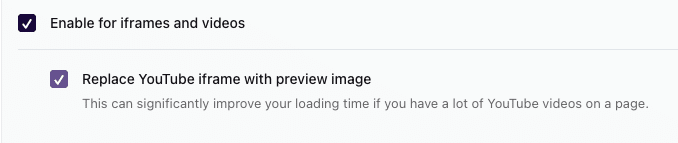
Lazy loading tells the browser only to load certain elements when the user has actually scrolled to them on a given page, rather than to load everything on the page immediately when requested. This helps prioritize what gets downloaded and when, so if a YouTube video is at the bottom of the page, it won’t actually get loaded until the user scrolls down to it – assuming they actually do. And if they don’t scroll to it, it never gets loaded, making the rest of the page load quicker.
You see this a lot with images too – prioritizing the content that gets delivered and only loading what’s need when it’s actually needed.
The “Replace YouTube iframe with preview image” option will take your video’s thumbnail graphic and overlay it on top of your embedded video, making it look like a clickable image. Once clicked, the video will begin to play.
This helps performance by not loading the entire video until it’s actually needed, and by displaying the thumbnail graphic, you’re telling the user that the video is there for them when they’re ready to click.
Preconnect to External Domains
This is a feature you don’t even need to enable in WP Rocket; by default, it will look at a given page, scan for any “external domains”, and automatically add code to “prefetch” content from them.
Any link, script, or iframe will be automatically reviewed for an external domain, and if one exists, WP Rocket will start the connection before the page loads in order to more quickly download the external content.
(Here’s the whole article on how this works.)
If you’re not using WP Rocket, and want to prefetch the DNS for YouTube, add this code to your site header:
<link rel="dns-prefetch" href="//www.youtube.com">
<link rel="dns-prefetch" href="//://ytimg.com">
That will connect the browser early to both the videos and the image thumbnails.
Speed Up Vimeo Loading with Previews and Prefetch
Sites embedding videos from Vimeo can also display image thumbnails as previews while the full video loads – but it requires custom code to implement.
In your functions.php file, add this:
function dgtlnk_get_vimeo_thumbnail_by_url( $video_url ) {
    $clean_url = esc_url_raw( trim( $video_url ) );

    if ( ! preg_match( '/vimeo\.com\/(?:video\/|embed\/)?([0-9]+)/', $clean_url ) ) {
        return false;
    }

    // 1. Request the maximum native width (1280) from Vimeo oEmbed API
    $api_url = 'https://vimeo.com/api/oembed.json?url=' . rawurlencode( $clean_url ) . '&width=1280';
    $response = wp_remote_get( $api_url );

    if ( is_wp_error( $response ) ) {
        return false;
    }

    $body = wp_remote_retrieve_body( $response );
    $data = json_decode( $body, true );

    if ( ! empty( $data['thumbnail_url'] ) ) {
        $img_url = $data['thumbnail_url'];

        // 2. Replace the native '_1280' resolution tag with standard HD size
        // Vimeo CDN supports exact matching increments like 1920 or 2560
        if ( strpos( $img_url, '_1280' ) !== false ) {
            return str_replace( '_1280', '_1920', $img_url );
        }

        // Alternative fallback pattern regex replacement if the URL structure varies
        return preg_replace( '/_[0-9]+x[0-9]+/', '_1920', $img_url );
    }

    return false;
}
This function connects to the Vimeo API, passes along the ID of the video, grabs the thumbnail image, and saves it as a variable you can insert into your WordPress theme.
If you’ve got an ACF field called hero_video (usually an oEmbed field), you’d then use this to grab and store the video’s thumbnail:
$hero_video = get_field('hero_video', false, false);
$hero_bg = dgtlnk_get_vimeo_thumbnail_by_url($hero_video);
Lastly, in order to output the video – including the thumbnail, which will be used as a background image until the video loads – use this, along with the youtube-background script:
<div data-vbg="<?=esc_url($hero_video);?>" id="hero--homepage-video"></div>Now, your video’s preview image will display as a background graphic until the entire video loads from Vimeo.
Like with YouTube, Vimeo can be prefetched as well; if you’re not using WP Rocket, add this code to your site’s header:
<link rel="preconnect" href="https://player.vimeo.com">
<link rel="preconnect" href="https://i.vimeo.com">
<link rel="dns-prefetch" href="https://f.vimeo.com">
Speeding up your site’s embedded videos can go a long way to improving performance and user experience. Any tweak you can make to make your load time quicker helps everyone – your organization, AI and search engine tools, and most importantly, your users.
Have questions about speeding up you videos? Reach out and let’s chat.